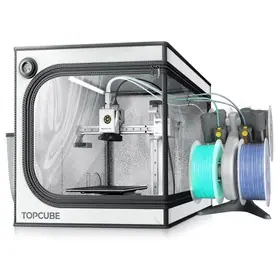
A workshop purchase starts with the work it must produce. Describe the intended objects, materials, typical dimensions and expected operating schedule before choosing equipment. A 3D printer and a laser machine solve different production tasks, so compare each within its own workflow. The useful question is whether the complete setup can produce the required work consistently under suitable operating conditions.
Define a representative job
Choose a small set of files and materials that represents the intended workload. For each job, specify the dimensions, finish expectations and acceptable variation. Ask a supplier to identify the machine settings and material used in any demonstration. A polished sample without that information does not tell you whether your own workflow can reproduce the result.
Read 3D printer specifications as a system
Check build volume, supported materials, nozzle and bed capabilities, software workflow and the accessories included. Creality's official model documentation lists these as distinct parameters. Do not choose solely by a maximum movement speed: request the settings and complete job time for the part you want to make. Include preparation, material changes and post-processing when assessing the work involved.
Confirm which replacement parts and consumables are available for the exact revision. Ask how calibration, routine cleaning and common maintenance are performed. If the intended material requires particular operating conditions, use the manufacturer's documented setup. A material name in a seller's title is not enough to establish compatibility across every formulation or application.
Specify the laser process separately
For laser equipment, identify whether the task is marking, engraving or cutting, and name the material and thickness. Distinguish the stated optical output from other power figures in the listing. Ask for a documented sample of the intended job, including passes, speed and accessories. A result on one material should not be used as evidence for another material with different properties.
Plan the workspace before delivery
Check the exact machine's safety instructions, enclosure requirements and ventilation arrangement. Include the space needed for access, material handling and approved accessories. Creality provides model-specific laser safety and accessory documentation; use the version relevant to the machine being considered. Have the proposed workplace and materials assessed by a competent person where appropriate. Do not improvise processing settings for unknown materials or bypass the equipment's protective features.
Compare the complete operating package
Request a quotation that separates the machine, enclosure if applicable, extraction equipment, computer or software requirements, fixtures, consumables and spare parts. Record recurring costs and the support arrangement. A lower machine-only price may describe a different scope from a package that includes essential accessories. Also ask which licences or services are required for the intended software features.
Use a repeatable acceptance job
Before expanding to several machines, run a documented representative job on the sample setup. Record preparation time, operator steps, output observations and any failures. These measurements support your own purchasing decision; they should not be replaced with a supplier's unrelated promotional demonstration. Save the machine revision, files and settings so that later deliveries can be compared on the same basis.
References: Creality's official 3D printer manuals, Falcon laser product documentation and laser accessory guides. This is original purchasing analysis, not a hands-on machine review.


Have something helpful to share? Be the first to join the conversation.